


Cheddar's Scratch Kitchen
3.6623.00 Reviews
App Specs
- Version
- 7.10.0
- Updated On
- License
- Free
- Downloads
- 100,000+
- Developer
- Darden Restaurants, Inc.
- Categories
- Food & Drink
- Platform
- Android
Screenshots
 Analysis by AppCompare
I tested Cheddar's Scratch Kitchen as a practical Food & Drink companion rather than treating it like a full restaurant-management platform. Its main job is straightforward: help me browse the menu, arrange a To Go order, and get directions to a Cheddar’s location. That focused approach makes sense for someone already planning a visit, especially when I want to check choices before leaving home instead of relying on a browser search or deciding at the counter.
The app is made by Darden Restaurants, Inc., and it is free to install for everyone. That matters when judging its value: there is no purchase price for accessing the app itself, while the food order remains a separate restaurant expense. I would not describe it as a money-saving tool automatically, because free access does not mean the meal costs less. Its value is mainly in reducing small bits of planning friction.
Using Cheddar’s Scratch Kitchen for a real meal plan
I use this section to think through the app as part of a real dinner plan, not just as a place to glance at menu items. The helpful move is to settle the destination before building a group order, then give everyone time to confirm their choices. That simple order of steps makes the next question—where the app fits and where it falls short—easier to judge.
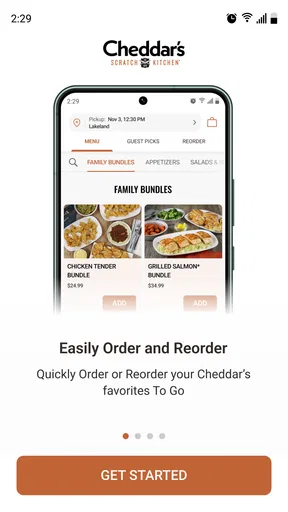
Menu browsing that helps before you leave
The menu is the natural starting point. I find this more useful than arriving hungry and trying to make a quick decision while other people in the group are waiting. Browsing ahead gives me time to compare the available choices at a calmer pace and decide whether the restaurant fits what I am looking for that day.
A realistic example is a weekday evening when I am picking up dinner after work. Instead of opening a general search engine, checking several result pages, and then switching to another service to place an order, I can use the Cheddar’s app to inspect the menu and move toward a To Go order in the same restaurant-focused flow. That does not remove every step, but it keeps the planning centered on the place I have already chosen.
The menu function is also useful for group decisions. If one person wants a substantial dinner, another wants something lighter, and someone else is simply asking what is available, checking the choices in advance is less awkward than trying to remember everything from a previous visit. I would still treat the displayed menu as a planning aid rather than assuming it answers every dietary question. For allergies or strict restrictions, I would ask the restaurant directly before ordering.
Ordering for pickup without making the app do too much
Cheddar’s Scratch Kitchen is most convincing when I already know I want Cheddar’s and need a To Go order. The ordering path is more purposeful than a general delivery marketplace because it is built around this restaurant rather than a large collection of unrelated businesses. That narrower scope can feel cleaner when I do not need to compare restaurants.
Worth Reading Before You Choose

EA SPORTS FC Mobile 26 Is a Bigger Football Game, but It Takes Time

Flipboard Shows What News Apps Must Do Beyond the Feed

Switching to Android Auto Means Rethinking Your Driving Routine

Google Calendar Makes a Crowded Week Easier to Manage

Ludo King Makes the Most of the Minutes Between Plans

Baby Panda World Brings Quick Play to Modern Phones, but Its Game Library Feels Busy
There is a useful trade-off here. A restaurant-specific app may be less convenient for someone who wants to compare delivery fees, estimated times, or menus from several nearby places in one screen. A broad ordering service is better for that kind of shopping. Cheddar’s own app makes more sense when the decision has already been made and I want a direct route to the restaurant’s menu and pickup process.
Before submitting an order, I would review the selected items carefully, confirm the chosen location, and check the order details rather than rushing through the final screen. This is especially important when several Cheddar’s locations are within driving distance. A few seconds spent checking the restaurant can prevent the annoying experience of arriving at the wrong place for pickup.
Directions are more useful than they first appear
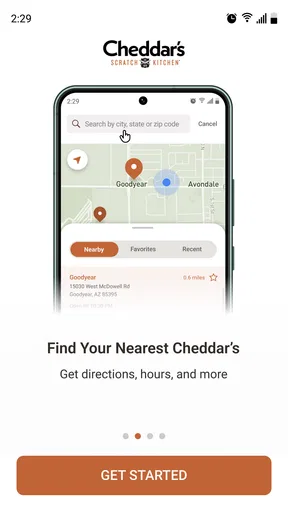
The location function is not just a decorative extra. If I am visiting an unfamiliar area, finding the right Cheddar’s location before ordering helps me choose where the food should be collected. In practice, I would start with the restaurant finder, select the intended location, and then use the directions option to continue the trip-planning process.
This workflow is valuable when a group is meeting somewhere new or when I am collecting food on the way home. It also reduces a common mistake: placing an order first and only afterward realizing that the selected restaurant is inconvenient. The app brings location choice closer to the ordering decision, which is the right order of operations.
I would not rely on the restaurant app alone for every navigation need. A dedicated maps app is usually better for traffic context, alternate routes, and broader trip planning. The Cheddar’s tool is best viewed as a restaurant locator that helps connect the menu and pickup decision to a place, not as a replacement for a full navigation service.
What the free price really means
The app itself is free, so the entry barrier is low. I can install it to browse the menu or find a location without paying for access. That makes it easy to recommend as a lightweight utility for an upcoming visit, even if I am not ready to order immediately.
Still, free access should not be confused with a free meal or guaranteed savings. The purchase value comes from the restaurant order, while the app provides the digital route to that order. I would judge it by convenience, clarity, and how well it supports pickup planning rather than by expecting discounts merely because the download costs nothing.
This distinction is important for anyone comparing it with a general food-ordering service. A marketplace may occasionally make its value visible through delivery comparisons or service-specific offers, while Cheddar’s app gives me direct access to this restaurant’s ordering experience. If my priority is the lowest total checkout amount, I would compare the final costs available to me instead of assuming one channel is automatically cheaper.
Small workflows that make it more practical
One of my preferred ways to use it is in two stages. I browse the menu earlier in the day, decide what I am likely to order, and then return when I am ready to choose the location and arrange pickup. Separating those decisions is less stressful than trying to solve the menu, restaurant, timing, and travel questions all at once.
A second useful habit is checking the location before spending time building the order. This is particularly helpful when I am ordering for a car journey or coordinating with another person. The restaurant closest to me is not always the one that fits the route, so confirming the destination first makes the rest of the process more sensible.
A third tip is to use the app as a pre-visit reference even when I plan to eat in the restaurant. Looking at the menu beforehand lets me arrive with a short list rather than opening the app only when everyone is seated. That is a modest benefit, but it is exactly the kind of everyday convenience a focused restaurant app should provide.
Making a pickup plan work for a group
For a shared meal, I would use the menu as a conversation starter rather than assuming one person should make every choice. A practical approach is to check the menu first, let everyone settle on their own preferences, and then have the person placing the order verify the items and location. This keeps the app useful without turning the ordering screen into a rushed group discussion.
There is a small but important trade-off when ordering for several people: a restaurant-focused app keeps the task in one place, but it does not replace careful coordination. I would confirm names and choices before submitting, particularly if someone has a dietary restriction or a specific request. Menu browsing helps narrow the options; a direct question to the restaurant remains the safer step when an ingredient or preparation detail matters.
Where the experience has limits
The focused design is also its biggest limitation. I would not install this app expecting a broad food-discovery tool, a restaurant comparison service, or a general-purpose meal planner. Its usefulness depends on already having Cheddar’s in mind. If I am undecided between several restaurants, another app will usually give me more options in one place.
The same applies to navigation. The restaurant finder helps me identify a Cheddar’s location, but anyone who needs detailed route planning will probably prefer a dedicated maps application. Using both can be the most practical arrangement: use Cheddar’s app to identify the restaurant and begin the pickup workflow, then use the phone’s mapping tool for the actual journey.
I also think the app is less compelling for people who rarely order To Go. If I am eating at the restaurant only once and already know where it is, browsing a mobile menu may not justify installing another app. In that case, a quick web search or asking the restaurant directly could be enough. The app earns its place when I expect to repeat the same planning pattern.
Compatibility and general accessibility
The app requires iOS 11 or later, so anyone using an older Apple device should check compatibility before planning around it. That requirement is not a problem for many current phones, but it is worth remembering if the app is being installed on an older family device or a phone that is rarely updated.
Its content rating is Everyone, which fits the straightforward nature of the experience. I would feel comfortable recommending it as a simple restaurant utility rather than an app aimed at a narrow age group. The current version is 7.10.0, and the app has been available since July 24, 2020, giving it a longer presence than a newly launched ordering experiment.
Public response is mixed rather than outstanding: it holds a 3.6 average from around 1.9 thousand ratings, with over 600 written reviews. I read that as a reason to keep expectations practical. The app appears useful for its core tasks, but I would not choose it because of a reputation for exceptional polish. The real question is whether its menu, pickup, and location tools match my particular visit.
What version history can and cannot tell me
The current version number and the app’s release date show that this is an established product rather than a brand-new restaurant app. That history is reassuring in a limited way: the core idea of bringing menu browsing, To Go ordering, and location help together has had time to become familiar to users. I would not treat the version number by itself as proof that every screen is flawless or that a particular feature has recently changed.
For an existing user, the useful question is less “what is new?” and more “does the current build still cover the job I need done?” If I mainly open it to check choices or start pickup, I can judge it by whether those tasks remain clear in my own routine. Before a time-sensitive meal, I would still make sure the location and order details are correct rather than assuming an app update removes the need to check.
Who will get the most value from it
I think the best audience is someone who visits Cheddar’s occasionally or regularly and prefers to organize a To Go meal before arriving. Families can benefit from browsing together, commuters can use it to plan a pickup stop, and anyone visiting an unfamiliar area can connect the restaurant choice with directions.
It is also a good fit for a person who dislikes making decisions at the counter. Checking the menu privately gives me time to think about the meal and discuss it with others. That is especially useful when ordering several meals, because the app can serve as a shared reference during planning rather than forcing everyone to decide in a hurry.
On the other hand, I would skip it if I mainly want delivery comparisons, restaurant discovery, detailed navigation, or a single app for every place I might eat. I would also skip the installation for a one-off visit if I already have the menu information I need and know the location. The free price removes financial risk, but it does not remove the cost of adding another app to a phone or another step to a simple plan.
What I would check before relying on it
If I were planning a pickup for a particular evening, I would first use the app to settle on a location, then look over the menu and check the order details before submitting. For a meal with tight timing, I would avoid assuming that seeing an ordering option guarantees the exact collection time I have in mind. The sensible plan is to use the app for the restaurant-specific steps and leave enough room for the real-world journey and handoff.
That advice also answers a common practical concern: should this replace a maps app or a general ordering marketplace? I would say no. It is a better fit for a known Cheddar’s visit, while maps remain stronger for the drive and marketplaces remain more useful when the restaurant itself is still undecided. The tools can complement each other, but there is little reason to force one app to handle a job it was not designed for.
My buy-or-skip verdict
I would recommend Cheddar’s Scratch Kitchen to anyone who already intends to eat at Cheddar’s and wants a direct way to browse the menu, prepare a To Go order, or locate the restaurant. The free download makes trying it easy, and the features are aligned with a clear everyday scenario: decide what to eat, choose the right location, and arrange pickup without jumping between unrelated tools.
My recommendation is more cautious for everyone else. This is not the best choice for comparing many restaurants or replacing a full maps service, and it should not be treated as proof of lower meal costs. Its value is convenience, not an automatic discount. If that convenience matches your routine, the app is a sensible addition; if you visit Cheddar’s rarely or want a wider food-ordering marketplace, I would skip it.
Overall, I see it as a focused restaurant companion with a clear purpose. It does not need to do everything to be useful. For a planned Cheddar’s pickup, keeping the menu, ordering path, and location search together is enough to make the visit easier. For broader food decisions, I would use a different tool and keep this one for the moments when Cheddar’s is already the destination.
Pros
- Generous portions make it easy to share or save leftovers.
- Scratch-made comfort food offers familiar
- satisfying flavors.
- Family-friendly menu includes options for different appetites.
- Rewards program can provide useful discounts and perks.
- Online ordering makes pickup convenient at participating locations.
Cons
- Portion sizes and quality may vary between restaurant locations.
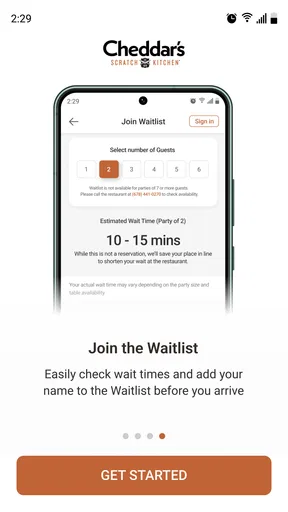
- Popular dining hours can involve long waits for a table.
- Some menu items are high in calories
- sodium
- or added sugar.
- Limited vegetarian choices may disappoint guests seeking more variety.
- Prices can feel high when adding drinks
- sides
- or desserts.
FAQs for Cheddar's Scratch Kitchen
What is Cheddar’s Scratch Kitchen, and what can I do with the app?
Cheddar’s Scratch Kitchen is the official mobile experience for exploring the restaurant’s menu, finding nearby locations, checking opening hours, and learning more about its scratch-made meals. Depending on your location and the current app version, you may also be able to browse available offers, place an order for pickup or delivery, and manage certain account or rewards features before visiting a restaurant.
Can I order food for pickup or delivery through Cheddar’s Scratch Kitchen?
In supported locations, the app may allow you to order meals for pickup or delivery by selecting a nearby Cheddar’s restaurant and choosing from the available menu. Service availability, delivery coverage, estimated preparation times, fees, and menu items can vary by location. Before confirming an order, review the restaurant details, total cost, customization options, and the selected pickup or delivery time.
Does the app show Cheddar’s menu, prices, nutrition, and allergen information?
The app generally provides access to Cheddar’s menu, including descriptions of entrées, sides, desserts, and beverages. Some items may include nutritional or allergen details, but this information can vary by restaurant and may change when ingredients or preparation methods are updated. Customers with allergies or dietary restrictions should verify ingredients directly with restaurant staff before ordering.
Are there coupons, rewards, or special offers available in the app?
Cheddar’s Scratch Kitchen may feature promotional offers, digital coupons, loyalty benefits, or other rewards depending on your region and the current program. Availability and eligibility can change, and some promotions may require an account, a minimum purchase, a specific restaurant, or an expiration date. Always read the full terms before relying on an offer when placing an order.
Is Cheddar’s Scratch Kitchen free to download, and what permissions or account details are required?
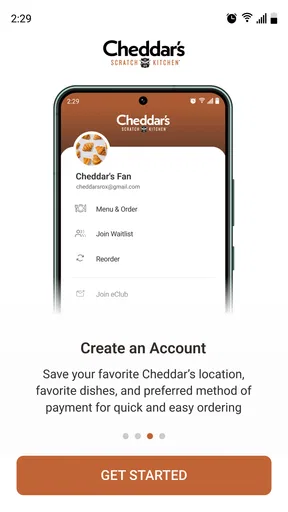
The Cheddar’s Scratch Kitchen app is typically free to download, although normal mobile data charges may apply and purchases made through the app are paid separately. You may be able to browse locations and menu information without creating an account, while ordering, saving preferences, receiving offers, or tracking rewards may require personal details such as an email address, phone number, and payment information.


